

Why Does My Upper Back Hurt After Working at a Desk?
Have you ever finished a long day at your desk only to notice a dull ache, stiffness, or tightness between your shoulder blades? If so, you are not alone. Upper back pain after working at a desk is a common problem among people who spend several hours sitting in front of a computer. It can affect office workers, students, remote employees, and anyone whose daily routine involves prolonged screen time. The discomfort may start as mild muscle tension and gradually become more noticeable throughout the day. Sometimes, it feels like a burning sensation between the shoulder blades. In other cases, the pain spreads toward the neck, shoulders, or middle of the spine.
But why does this happen, even when you are simply sitting and working?
The answer often involves a combination of prolonged sitting, workstation ergonomics, muscle fatigue, repetitive movements, and limited physical activity. Fortunately, there are practical ways to reduce discomfort and make your workspace more comfortable.
In this guide, we will explain the most common causes of upper back pain after sitting at a desk, how your workstation may contribute to the problem, which exercises can help, and when you should consider getting professional medical advice.
What Is Upper Back Pain?
The upper back, also known as the thoracic spine, is the region between the base of your neck and the bottom of your rib cage. It includes twelve vertebrae, surrounding muscles, ligaments, joints, and other supporting structures.
This area plays an important role in maintaining posture, supporting your upper body, and allowing movements such as twisting, reaching, and bending.
Upper back pain can feel different depending on its cause. Common symptoms include:
- A dull ache between the shoulder blades.
- Tightness across the upper back and shoulders.
- Stiffness after sitting for extended periods.
- Discomfort when turning or stretching your upper body.
- Muscle tenderness around the shoulder blades.
- Pain that becomes more noticeable toward the end of the workday.
For many desk workers, symptoms are related to muscular fatigue and prolonged static positions. However, upper back discomfort can have other causes, so persistent or unusual symptoms should not automatically be blamed on posture.
Why Does My Upper Back Hurt After Working at a Desk?

There is rarely just one reason for desk-related upper back discomfort. In most cases, several factors work together.
Understanding these factors can help you identify what might be contributing to your symptoms and make appropriate changes.
1. Sitting in the Same Position for Too Long
One of the most common reasons for upper back pain is staying in one position for extended periods.
When you sit at a desk, your back and shoulder muscles help support your upper body. If you remain in the same position for hours, these muscles may become fatigued.
Even when your sitting position seems comfortable, maintaining it without movement can create ongoing muscular demands.
Over time, you may notice:
- Tight muscles around your shoulder blades.
- A stiff feeling in your upper spine.
- Discomfort when standing up.
- Increased tension around your neck and shoulders.
The important point is that sitting itself is not necessarily harmful. The problem is often the combination of prolonged sitting and insufficient movement.
What can you do?
Try changing positions throughout your workday. Stand up, walk around, stretch gently, or switch to a different task whenever possible.
A practical starting point is to take a short movement break every 30 minutes. You do not need a complicated exercise routine. Even a brief walk can help interrupt long periods of sitting.
2. Poor Sitting Posture
Your sitting position can influence how much work your upper back muscles need to perform.
For example, when you lean forward toward your computer, your head and shoulders may move ahead of your body’s natural alignment. Your upper back muscles then have to work continuously to support this position.
You might also notice that your shoulders gradually round forward as you become more focused on your screen.
This position can contribute to muscle fatigue, stiffness, and discomfort around the shoulder blades.
However, it is important to understand that there is no single perfect posture that everyone must maintain all day.
A comfortable posture is one that allows you to work without unnecessary strain while giving your body opportunities to move and change positions.
Practical solution:
- Sit comfortably with your back supported.
- Keep your shoulders relaxed.
- Avoid continuously reaching forward.
- Position your head comfortably above your shoulders.
- Change your sitting position regularly.
Rather than forcing yourself to sit perfectly straight, focus on finding a comfortable position and moving throughout the day.
3. Your Computer Screen Is Too Low
A computer monitor that sits too low can encourage you to bend your neck and upper back forward.
This commonly happens when people use laptops directly on a desk.
Because the screen and keyboard are attached, laptop users often have to choose between looking down at the screen or raising their arms to type.
Looking down for long periods may increase tension around the neck and upper back.
You might experience discomfort near the base of your neck, between your shoulder blades, or across your upper shoulders.
How to fix it:
Position your monitor so that you can look at the screen without repeatedly bending your neck.
For laptop users, a laptop stand combined with an external keyboard and mouse can make a significant difference.
If you use a desktop computer, adjust the monitor height and distance until reading feels comfortable.
The goal is simple: your screen should work for your body, not force your body to adapt to an uncomfortable screen position.
4. Rounded Shoulders and Forward Head Position
Rounded shoulders and a forward head position are common patterns among people who spend long hours working on computers.
When your shoulders move forward and your head shifts toward the screen, the muscles around your neck, upper back, and shoulder blades may experience additional demands.
This can contribute to tightness and discomfort, particularly when the position is maintained for long periods.
You may notice that:
- Your shoulders feel tense after typing.
- The area between your shoulder blades becomes uncomfortable.
- Your neck feels stiff when looking away from the screen.
- You frequently want to change your sitting position.
These symptoms do not necessarily indicate a serious spinal problem. They may simply reflect the effects of prolonged muscular activity and limited movement.
What helps?
Try gentle shoulder movements throughout the day. Relax your shoulders, move them backward and forward, and occasionally stand up to change your position.
Strengthening and mobility exercises may also help improve comfort and make everyday movements easier.
5. An Incorrect Desk and Chair Setup
Your workstation plays a major role in how comfortably you can work.
A chair that is too low, a desk that is too high, or a keyboard positioned too far away can encourage awkward movements.
For example, if your desk is too high, you may raise your shoulders while typing. If your keyboard is too far away, you may repeatedly reach forward.
Both situations can increase muscular effort around your shoulders and upper back.
Here are some common workstation problems:
| Workstation Problem | Possible Effect |
|---|---|
| Monitor positioned too low | Encourages looking downward |
| Keyboard too far away | Encourages forward reaching |
| Chair without adequate support | Makes comfortable sitting more difficult |
| Desk too high | May cause shoulder tension |
| Feet unsupported | Can make it harder to maintain a comfortable sitting position |
| Mouse positioned too far away | Encourages repeated shoulder reaching |
How to improve your setup:
Adjust your chair so your feet can rest comfortably on the floor or on a footrest.
Keep your elbows close to your body and your forearms comfortably supported. Place your keyboard and mouse within easy reach.
Your monitor should be directly in front of you, rather than positioned to one side.
Small adjustments can make your daily working position much more comfortable.
6. Muscle Weakness and Limited Physical Activity
Your upper back muscles help stabilize your shoulders and support movements throughout the day.
When your daily routine involves little physical activity, these muscles may have fewer opportunities to work through their normal range of movement.
This does not mean that everyone who experiences upper back pain has weak muscles. However, reduced activity and limited movement can contribute to discomfort for some people.
Regular physical activity can help maintain muscle strength, mobility, and general physical function.
You do not need an intense workout to support your back.
Walking, swimming, cycling, and appropriate strengthening exercises can all contribute to a more active routine.
If you spend most of your day sitting, finding opportunities to move outside working hours is particularly helpful.
7. Stress and Muscle Tension
Physical discomfort is not always related to workstation positioning.
Stress can also influence how your muscles feel.
During stressful situations, people sometimes unconsciously raise their shoulders, tighten their neck muscles, or maintain a tense sitting position.
If this happens repeatedly throughout the day, you may experience increased tightness around your shoulders and upper back.
Long working hours, tight deadlines, poor sleep, and limited opportunities to relax may contribute to this pattern.
Try these simple strategies:
- Take short breaks between demanding tasks.
- Relax your shoulders when you notice tension.
- Practice slow, comfortable breathing.
- Avoid working through every break.
- Maintain a consistent sleep routine.
Managing stress is not a replacement for addressing physical causes, but it can be a useful part of an overall approach to reducing discomfort.
How to Tell If Your Desk Setup Is Causing Upper Back Pain?
If your upper back hurts mainly during or after computer work, your workstation habits may be contributing to the problem.
However, this pattern alone cannot confirm the cause.
Pay attention to when the discomfort starts, what makes it worse, and whether it improves when you change activities.
Here are some patterns worth noticing:
Pain that develops gradually during the workday: This may be associated with prolonged sitting, muscle fatigue, or workstation positioning.
Discomfort between the shoulder blades: This can involve muscles that support the shoulder blades and upper spine.
Pain that increases when reaching forward: Your desk arrangement or working position may be contributing.
Stiffness after sitting for a long time: Limited movement may be playing a role.
Discomfort that improves after walking: Changing positions and gentle movement may help reduce symptoms.
Consider keeping a simple record for several days. Note when your pain starts, how long you have been sitting, and which activities seem to make it better or worse.
This information can also help a healthcare professional understand your symptoms.
How to Relieve Upper Back Pain After Sitting at a Desk?
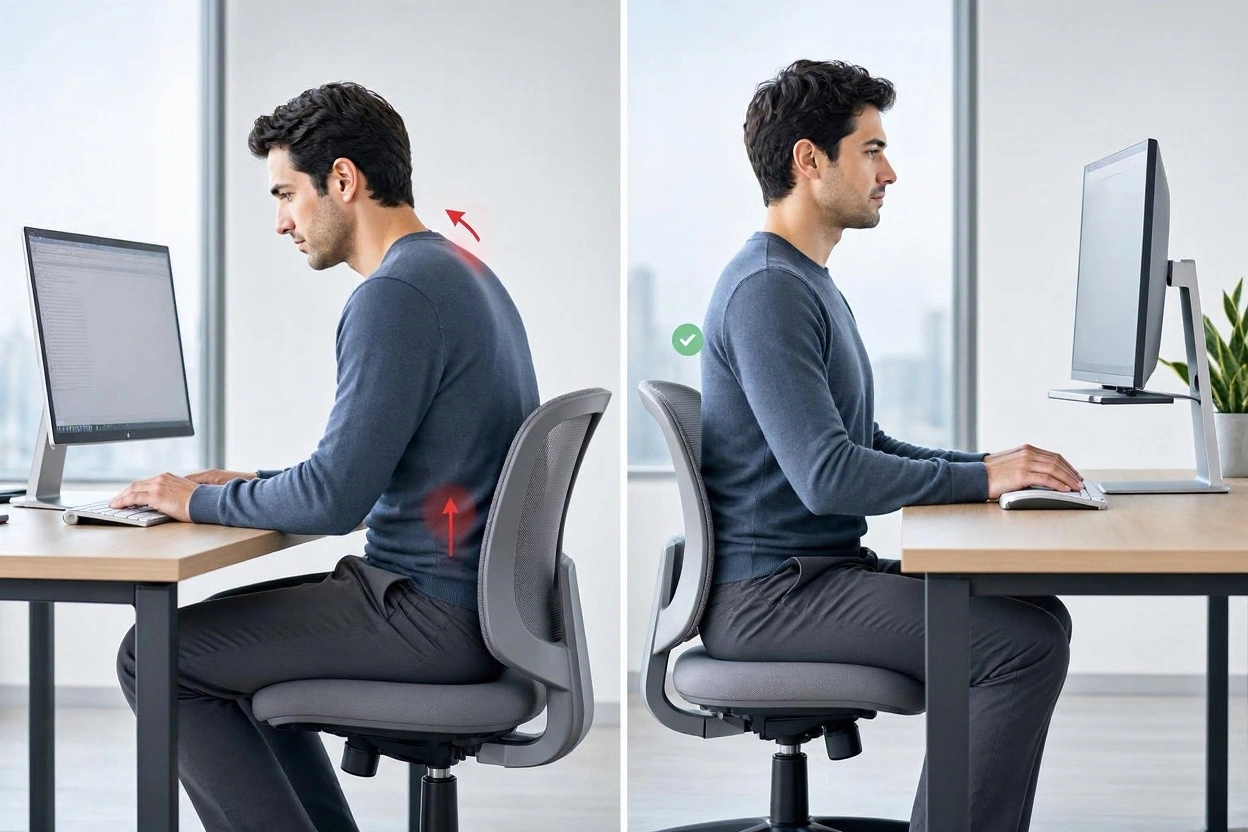
The most useful approach usually combines workstation adjustments, regular movement, and gentle exercises.
You do not need to change everything at once. Start with a few manageable adjustments and see how your body responds.
1. Take Regular Movement Breaks
One of the simplest ways to reduce the effects of prolonged sitting is to interrupt it regularly.
Set a reminder to stand up or change activities approximately every 30 minutes.
During your break, you can:
- Walk around your room or office.
- Refill your water bottle.
- Gently move your shoulders.
- Stretch your arms.
- Change your sitting position.
- Take a short walk outside when possible.
Frequent short breaks are often easier to maintain than waiting until the end of the day to move.
2. Adjust Your Monitor Height
Your monitor should be positioned so you can read comfortably without constantly bending your neck.
For most people, placing the screen directly in front of them, with the top of the display around eye level or slightly below, is a useful starting point.
However, your screen position may need individual adjustment depending on your height, eyesight, and working habits.
If you use a laptop, consider a separate keyboard and mouse when raising the screen.
3. Keep Your Keyboard and Mouse Close
Reaching forward repeatedly can increase tension around the shoulders and upper back.
Place your keyboard and mouse close enough that your elbows can remain near your body.
Your shoulders should feel relaxed rather than lifted or stretched forward.
If you frequently use a mouse, make sure it is positioned comfortably beside your keyboard.
4. Use a Supportive Chair
A comfortable chair should allow you to sit with your back supported and your feet comfortably resting on the floor.
Look for an adjustable chair that allows you to change the seat height and backrest position.
Your chair should also provide enough space for your thighs without pressing against the back of your knees.
Remember that an expensive chair is not automatically the best choice. Proper adjustment and regular movement are equally important.
5. Change Positions Throughout the Day
You do not have to remain seated for every task.
If your workplace allows it, alternate between sitting and standing.
You can also take phone calls while walking or complete certain tasks away from your desk.
The goal is not to stand all day instead of sitting. It is to avoid remaining in one position for too long.
5 Simple Exercises for Upper Back Pain From Desk Work
Gentle movement can help reduce stiffness and improve mobility around your upper back and shoulders.
The following exercises are simple options that many people can perform without special equipment.
Start slowly and stay within a comfortable range of movement. Stop if an exercise causes pain, dizziness, numbness, or other unusual symptoms.
1. Shoulder Rolls
Shoulder rolls help you move your shoulders after long periods of typing,
are a simple way to introduce movement into your working day.
How to perform them:
- Sit or stand comfortably.
- Relax your arms beside your body.
- Slowly lift your shoulders toward your ears.
- Move them gently backward and downward.
- Repeat five to ten times.
- Reverse the direction if comfortable.
Avoid forcing the movement or creating unnecessary tension in your neck.
You can perform this exercise during a short break.
2. Seated Thoracic Extension
This movement encourages gentle extension through your upper back.
How to perform it:
- Sit in a stable chair.
- Place your hands behind your head or across your chest.
- Keep your lower body comfortably supported.
- Gently extend your upper back over the chair’s backrest.
- Hold briefly.
- Return to your starting position.
Repeat three to five times if comfortable.
Do not force your spine backward or hold your breath.
3. Shoulder Blade Squeezes
Shoulder blade squeezes gently activate the muscles around your upper back.
How to perform them:
- Sit or stand with your arms relaxed.
- Gently move your shoulder blades toward each other.
- Keep your shoulders relaxed and avoid shrugging.
- Hold for approximately three to five seconds.
- Release slowly.
Repeat five to ten times.
The movement should feel controlled and comfortable, not forced.
4. Doorway Chest Stretch
Tightness around the chest muscles may contribute to an uncomfortable shoulder position for some people.
A gentle doorway stretch can help improve chest mobility.
How to perform it:
- Stand in an open doorway.
- Place your forearms against the doorframe.
- Keep your elbows at a comfortable height.
- Slowly move your body forward until you feel a gentle stretch across your chest.
- Hold for 15 to 20 seconds.
- Return to your starting position.
Repeat two or three times if comfortable.
Avoid pushing into pain or stretching aggressively.
5. Gentle Upper Body Rotation
Your thoracic spine helps your upper body rotate.
Gentle rotation can help maintain comfortable movement throughout the day.
How to perform it:
- Sit comfortably with your feet supported.
- Cross your arms over your chest.
- Slowly turn your upper body to one side.
- Return to the center.
- Repeat on the opposite side.
Perform three to five repetitions on each side.
Keep the movement gentle and avoid twisting beyond your comfortable range.
Important: These exercises are general movement suggestions, not a treatment plan for every cause of upper back pain. If you have an injury, an existing medical condition, or symptoms that worsen with movement, seek advice from a qualified healthcare professional before continuing.
How to Prevent Upper Back Pain When Working at a Desk?
Reducing existing discomfort is helpful, but preventing it from returning is equally important.
The best strategy is to build healthier working habits that are easy to maintain.
Create an Ergonomic Workspace
Start by reviewing your entire workstation.
Your monitor, chair, desk, keyboard, and mouse should work together to support a comfortable position.
Keep frequently used items within reach to avoid repeated twisting and reaching.
If you use a laptop regularly, consider whether a separate monitor or laptop stand would improve your setup.
Follow a Simple Break Schedule
It is easy to lose track of time when concentrating on work.
However, regular movement should become part of your daily routine.
Here is a simple example:
| Time | Recommended Action |
|---|---|
| Every 30 minutes | Stand up or change position |
| Every hour | Take a short walk or movement break |
| Morning | Check your chair and screen position |
| Afternoon | Review your posture and workstation comfort |
| After work | Include enjoyable physical activity |
Adjust this schedule to your needs and working environment.
Consistency matters more than following an exact timetable.
Stay Physically Active Outside Work
Your body benefits from movement beyond the office.
Walking, swimming, cycling, and other enjoyable activities can support general fitness and physical well-being.
If you are new to exercise, start gradually and choose activities that feel comfortable.
You can also ask a physiotherapist about exercises that are appropriate for your individual needs.
Avoid Working With Your Laptop on Your Lap for Long Periods
Working on a laptop while sitting on a sofa or bed may seem comfortable initially.
However, these positions often encourage looking downward and reaching forward.
If you regularly work from home, try creating a dedicated workspace with a stable surface, a supportive chair, and a properly positioned screen.
Even a small improvement can make your working environment more comfortable.
When Should You See a Doctor for Upper Back Pain?
Most desk-related upper back discomfort is not an emergency. Nevertheless, not every type of back pain comes from sitting or poor workstation ergonomics.
You should consider seeking medical advice if:
- Your pain continues despite reasonable changes to your daily routine.
- Your discomfort is getting progressively worse.
- The pain repeatedly interferes with sleep or everyday activities.
- You experience persistent numbness or tingling.
- You notice weakness in your arms or hands.
- Your pain started after a fall, accident, or other injury.
- You have unexplained fever or other concerning symptoms.
Seek urgent medical attention if upper back pain occurs with chest pain, difficulty breathing, fainting, or sudden significant neurological symptoms.
A healthcare professional can assess your symptoms, review your medical history, and determine whether further investigation or treatment is necessary.
Do not assume that every pain between the shoulder blades is caused by posture.
Frequently Asked Questions About Upper Back Pain After Working at a Desk
1. Why does my upper back hurt after sitting at my desk all day?
Upper back pain after sitting at a desk may result from prolonged static positions, muscle fatigue, workstation ergonomics, and limited movement.
Leaning forward, reaching for a keyboard, or working with a low monitor can also contribute to discomfort around the shoulder blades and upper spine.
Taking regular breaks, adjusting your workstation, and incorporating gentle movement may help.
2. Can Sitting at a Desk Cause Pain Between the Shoulder Blades?
Yes. Prolonged sitting and repetitive working positions can contribute to muscle fatigue and tension around the shoulder blades. This is particularly common when your shoulders remain rounded forward, your posture is uncomfortable, or you repeatedly reach toward your computer.
However, pain between the shoulder blades can have several possible causes, including muscle strain, poor posture, and other underlying conditions. To better understand this type of discomfort, read our guide on common causes of pain between the shoulder blades.
If your pain persists, becomes worse, or is accompanied by other concerning symptoms, consider seeking medical advice.
3. How often should I take breaks when working at a computer?
A useful starting point is to change positions or take a short movement break approximately every 30 minutes.
You can stand, walk, stretch gently, or switch to a task that does not require continuous computer use.
The most important thing is to avoid remaining in one position for several hours without movement.
4. Is poor posture the main cause of upper back pain?
Poor workstation positioning can contribute to upper back discomfort, but it is not the only possible cause.
Muscle fatigue, stress, inactivity, repetitive movements, previous injuries, and other health conditions may also play a role.
There is no single perfect posture. Regular movement and comfortable positioning are more useful goals than trying to maintain one rigid position all day.
5. What is the best sitting position to prevent upper back pain?
A comfortable sitting position generally includes:
- Your back supported by the chair.
- Your shoulders relaxed.
- Your head comfortably aligned with your upper body.
- Your elbows close to your sides.
- Your feet supported.
- Your monitor directly in front of you.
You should also change positions regularly instead of trying to hold the same posture throughout the day.
6. Can a standing desk help with upper back pain?
A standing desk may help some people because it makes changing positions easier.
However, standing continuously is not necessarily better than sitting continuously.
The most useful approach is usually to alternate between sitting, standing, and walking throughout the day.
Make sure your screen and keyboard are adjusted appropriately in both positions.
7. What exercises are good for upper back pain from desk work?
Gentle shoulder rolls, shoulder blade squeezes, thoracic extension, doorway chest stretches, and comfortable upper body rotations are useful movement options.
Choose exercises that feel comfortable and avoid forcing your body through painful movements.
If your symptoms are persistent or you have an existing injury, ask a physiotherapist which exercises are appropriate.
8. Why does my upper back hurt more at the end of the workday?
Muscle fatigue can gradually increase after several hours of sitting, typing, and maintaining similar positions.
Your muscles may become more uncomfortable when they have had limited opportunities to relax and move.
Adjusting your workstation and taking regular movement breaks may help reduce this pattern.
9. Can a bad office chair cause upper back pain?
An uncomfortable or poorly adjusted chair can contribute to upper back discomfort.
For example, a chair that does not support your back comfortably may encourage forward leaning or other awkward positions.
However, the chair is only one part of the workstation. Monitor height, desk position, keyboard placement, and working habits also matter.
10. How long does desk-related upper back pain take to improve?
There is no universal recovery timeline because the cause and severity of upper back pain vary.
Some mild discomfort may improve after changing working habits and reducing prolonged static positions.
Other cases may require professional assessment and a more individualized management plan.
If your symptoms persist, worsen, or interfere with daily activities, consult a healthcare professional rather than relying only on self-care.
Final Thoughts: Take Care of Your Back While Working at a Desk
Upper back pain after working at a desk can make even simple daily tasks uncomfortable. However, prolonged sitting, muscle fatigue, workstation positioning, and limited movement are factors you can often address.
Start by checking your chair, monitor, keyboard, and mouse. Make sure your workspace allows you to sit comfortably without repeatedly reaching forward or bending your neck.
More importantly, remember that your body is not designed to remain in exactly the same position throughout the day.
Take regular movement breaks, include gentle exercises in your routine, and stay physically active outside working hours.
Small, consistent changes can make your workday more comfortable and help you develop healthier habits over time.
If your upper back pain does not improve, becomes worse, or comes with concerning symptoms, seek professional medical advice to identify the underlying cause.
Recommended Resources for Upper Back Pain and Office Ergonomics
Understanding the causes of upper back pain after working at a desk is an important step toward improving your daily comfort. However, learning more about workplace ergonomics, proper sitting positions, and back health can help you make better decisions about your working environment.
For additional information and professional recommendations, explore these trusted medical resources:
- Cleveland Clinic – Upper Back Pain: Learn about common causes, symptoms, and possible treatments for upper back discomfort.
- Mayo Clinic – Office Ergonomics: Discover practical ways to adjust your chair, monitor, keyboard, and workstation to support a more comfortable working position.
- American Academy of Orthopaedic Surgeons – Preventing Back Pain at Work and at Home: Find useful recommendations for maintaining back health during everyday activities.
- Chelsea and Westminster Hospital – Desk Health Ergonomics: Explore workplace ergonomics, movement breaks, and practical desk exercises.
These resources provide additional educational information about back health and workplace comfort. If your upper back pain persists, becomes worse, or is accompanied by concerning symptoms, consult a qualified healthcare professional for an appropriate assessment.